Turn one drum track into seven.

ReStem 2 is a stem separator made exclusively for drums. Give it a mixed drum recording and it automatically splits it into separate tracks, extracting the kick, snare, hi-hat, toms, ride, and crash, plus a dedicated "other" stem for anything that isn't a drum. ReStem does this live while the track plays in your DAW, or rendered offline for the best possible quality. Either way, every drum ends up on its own fader.

macOS · Windows · AU, VST3, VST, AAX · ARA2 · Standalone app included
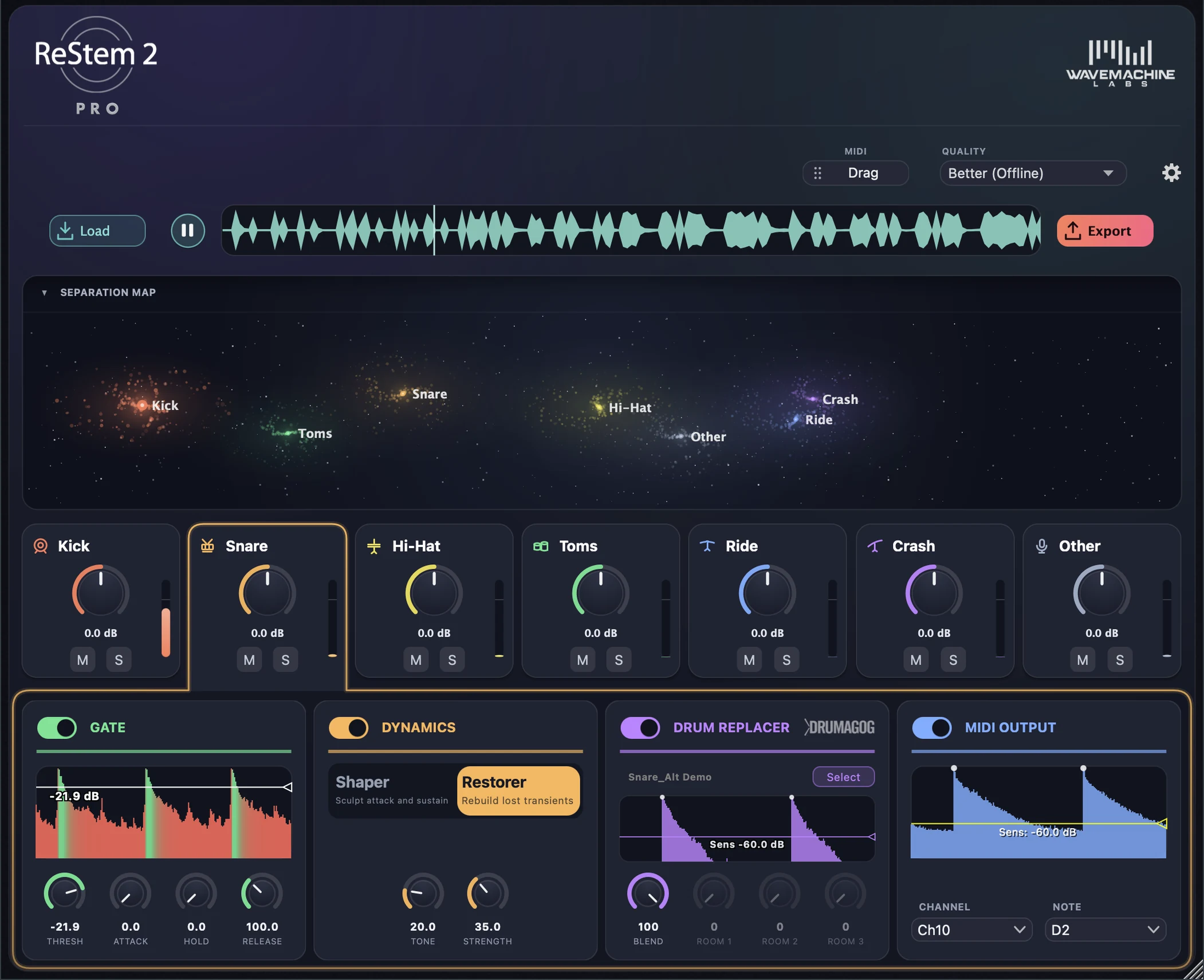
ReStem 2 with a drum track separated into seven stems

When all you have is the stereo mix.

Not every drum recording comes with a full set of multitracks. Sometimes all you have is a single stereo file: a room-mic recording, a rehearsal take, an old session that was bounced down, or a loop you bought years ago. That's where ReStem 2 shines. Put it on the track and it separates the kit onto individual faders, so you can adjust each drum's level, mute or solo it, or move it onto its own track in your DAW.

Kick Snare Hi-Hat Toms Ride Crash Other

Great for cleaning up existing tracks.

ReStem is also great at removing bleed from existing drum tracks. Whether your snare track has hi-hat leakage, or your live recording has bass guitar all over the drum tracks, ReStem can easily clean it up, leaving you with pristine drum tracks.

The quality selector runs from live to full render.

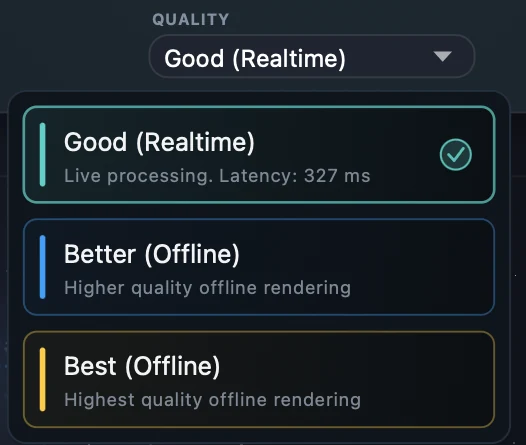
The first ReStem didn't separate drums live at all. We tried, but the quality wasn't good enough to put our name on it. ReStem 2 changes that. The new realtime mode separates the drums live while the track plays, and two offline modes take a little longer but go further when you want the cleanest result. See how the modes compare

Good (Realtime) New

Live on the insert

The drums separate as the track plays, so you hear the stems right away. It's the quickest way to work.

Better (Offline)

Rendered

Renders the whole file for cleaner results than the live mode can give you. Now twice as fast as the previous ReStem version.

Best (Offline)

Rendered

The best quality ReStem offers. It takes a little longer, and it holds up best on messy recordings with a lot of bleed from other instruments.

Built for drums and nothing else.

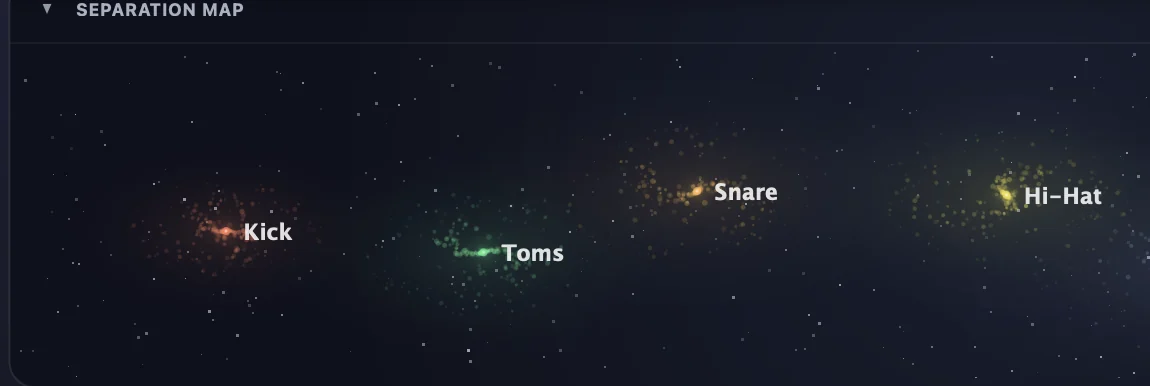
Most separation tools treat the whole kit as a single instrument. ReStem only works on drums, and that focus is what lets it pull one stereo track apart into seven stems you can actually mix. While the track plays, the Separation Map shows each drum as its own cluster of stars in real time, allowing you to visualize where each drum sits in the mix.

Inside the separation engine
The Separation Map: kick, toms, and snare constellations

A channel strip behind every drum.

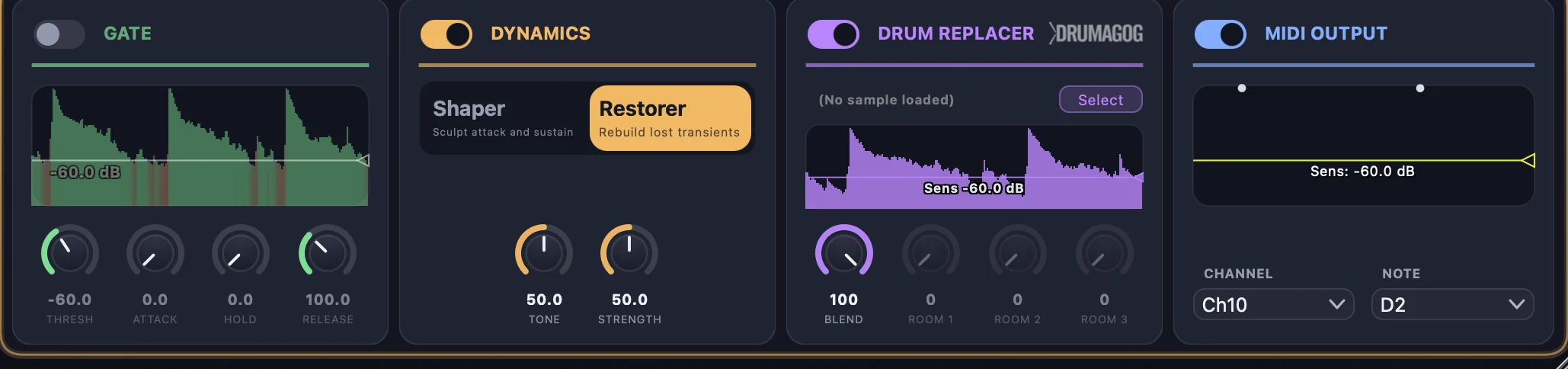
Once the kit is separated, each stem gets its own set of tools. You can gate the bleed that sits between hits, and push or soften the dynamics of each drum. On the kick and snare you can also rebuild the transient on problem tracks. All of it lives inside the plugin window, one strip per drum, with nothing to patch or route.

Tour the built-in effects
Per-stem rack: Gate, Dynamics, Drum Replacer, MIDI Output

Swap the snare, or trigger something new.

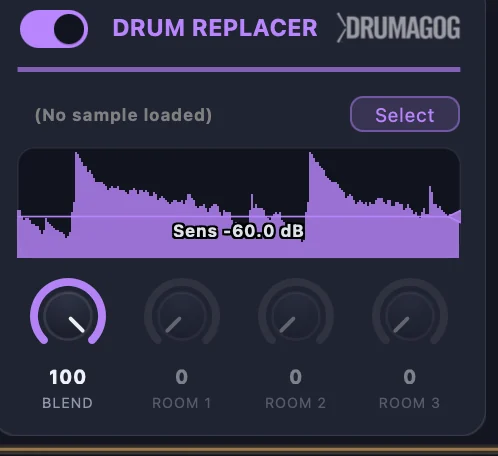
Drumagog has been WaveMachine Labs' drum-replacement tool for more than twenty years, and it's built right into ReStem on the kick and snare tracks. Enable it, and it swaps in a sample of your choice, lined up so it lands right on the original hit. Every stem can also send MIDI, using our new trigger engine, TrigNet. It keeps up with fast playing like blast beats and ghost-note rolls, so the original performance can drive any drum instrument you own.

Replacement and MIDI in depth
Drum Replacer panel with the Drumagog engine

Process right on the timeline.

If your DAW supports ARA, ReStem 2 can read the track the moment you add it. You press PROCESS and the stems appear after processing, with no bouncing and no separate recording pass. In any other DAW it works as a normal insert, and there's also a standalone app for when you aren't in a DAW at all.

Workflows, formats, and hosts
Quality selector opened inside a DAW

Everything happens on your own computer.

Nothing is ever uploaded to the cloud, so everything works even with the network cable unplugged. And the engine is repeatable, so the same file always gives you the same stems, right down to the sample.

New in ReStem 2

If you used ReStem 1, here's what's changed. The separation engine was rebuilt from scratch for version 2, and it brought a lot of new things along with it.

Live separation New

You can now separate drums live, as the track plays. ReStem 1 only worked offline, but the new engine made live quality good enough to ship. ReStem 2 also improved the speed of processing in offline mode. It's now twice as fast as the original version.

The quality modes

Auto MIDI Notes New

When using the new MIDI Output feature, toms are sorted by pitch, and hi-hats come through as open, closed, or pedal. Your drum instrument plays the right articulation without any setup.

Replace & trigger

ARA2 on the timeline New

In a DAW that supports ARA, one press of the PROCESS button gives you the stems (after processing), with no bouncing or recording pass. ReStem 1 couldn't do this.

In your DAW

TrigNet MIDI New

Every stem can send MIDI now, driven by our new TrigNet trigger engine. It even keeps up with blast beats, double-kick, and fast ghost-note rolls.

Replace & trigger

Transient Restorer New

Bring back the sharp attack on the kick and snare that a stereo mixdown rounds off. It sits next to the Transient Shaper that ReStem 1 already had.

Built-in effects

The Separation Map New

Watch the kit come alive as it plays. Each drum shows up as its own cluster of stars that light up on every hit. Deeper drums sit to the left, harder hits climb higher, and wider-sounding drums grow wider clusters.

See it move

Two editions

ReStem 2 Core
The standalone separator
$99
  • Standalone app for macOS and Windows
  • Both offline quality modes, including Best
  • Re-balance, mute, and solo all seven stems
  • Export stems and mixdowns
What's in Core

Hear your drums come apart.

The 7-day free trial unlocks the full Pro feature set. Try it on the roughest drum recording you've got.

User's Guide · Release notes · Specs & FAQ